
How PPV Unlocks Add Up on Free OnlyFans Pages
OnlyFans free pages look costless because the subscription itself is $0, but the spending usually starts after the follow, not before it. This article follows the unlock trail from the first locked message to the monthly total, and it explains why pay-per-view (PPV) charges on a free page can quietly add up. The figures here come from platform rules and the tracking habits that BestOnlyFans uses when it compares pages. BestOnlyFans refreshes its rankings every month.
A free page sets its subscription price to $0 and earns through PPV messages, tips, and paid chat instead. That single design choice explains almost everything about how costs appear on these pages. Nothing is charged at the door, so the money changes hands in small amounts later, usually one message at a time.

Where the Free Page Model Actually Earns
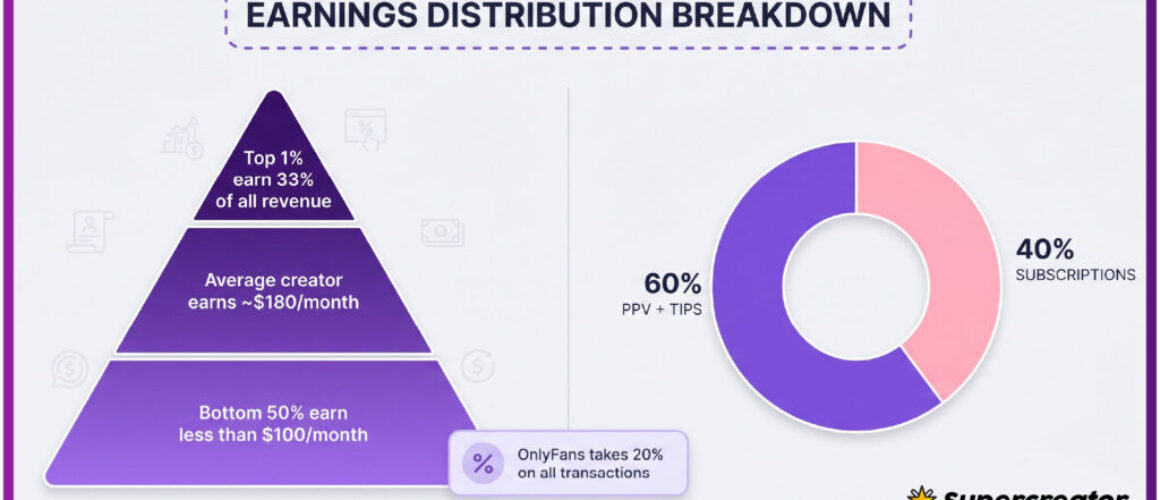
When the subscription price is $0, the creator keeps 80% of everything else the page generates. The platform takes a 20% fee on all payments, including unlocks, tips, and paid chat. A free page therefore depends on volume rather than a single monthly charge.
The revenue channels are limited and predictable, which makes them easy to track once you know what to look for.
- PPV messages, where a locked post or direct message unlocks for a set price.
- Tips, which are voluntary and can reach $100 in a single payment.
- Paid chat, which commonly runs $3-$5 per message.
None of these appear as a line item on a statement the way a subscription does. They arrive as individual decisions, and that is exactly why the total is easy to lose track of.
A paid subscription renews once a month and shows up as one charge. A free page asks for money in smaller pieces, more often, and each request feels separate from the last.
Reading Locked Messages Correctly
A PPV message arrives with a preview and a price, and the content stays hidden until you pay. The unlock price is set by the creator and can go up to $50 for a single message.
Treat the price as the cost of that one item, not as a step toward anything else. There is no bundle and no discount for unlocking several messages in a row unless the creator states one directly.
- Read the preview text and check whether it describes something you actually want.
- Note the unlock price and compare it to your remaining budget for the month.
- Check whether the same creator has sent several locked messages in a short period.
- Decide before opening the message again, so the preview does not do the persuading twice.
- Record the amount if you unlock, so the total stays visible later.
The issue is frequency, because a page that sends locked messages daily can turn a $0 subscription into a recurring cost within a few weeks.
Tip: decide your monthly unlock ceiling before you open any locked message. A limit set in advance is far easier to keep than one set in the moment, when the preview is already in front of you.
The $3-$5 Paid Chat Range in Context
Paid chat commonly runs $3-$5 per message, and that range is where most of the quiet spending happens. Chat feels like conversation rather than a purchase, so the per-message price rarely registers while the exchange is ongoing.
The math becomes clearer when you line a short chat session up against a subscription price.
- Five paid messages at $3 each total $15.
- Eight messages at $4 each total $32.
- Ten messages at $5 each total $50.
- A month of two such sessions can exceed $49.99, the top of the paid subscription range.
Paid chat is not the same as a PPV unlock, but it draws from the same budget. If you track unlocks and ignore chat, your monthly figure will be wrong by a wide margin. Both belong in the same log.

Why Unlocks Feel Smaller Than Subscriptions
A $9.99 subscription is one decision, made once, and it appears as a single charge. Nine unlocks at roughly $1 each would feel like almost nothing, even though the totals are close. The difference is not the amount but the number of separate moments where money leaves. Each unlock is small enough to pass without review, and each one arrives with a preview designed to be read quickly.
That combination is what makes free pages harder to budget than paid ones. The spending is real, but the friction that normally slows it down is missing. Subscriptions also announce themselves, since a renewal date is predictable and you can cancel before it arrives.
Unlocks have no schedule, so there is no date to circle and no reminder to act on. This is not a flaw in the platform so much as a feature of how per-item pricing works. Small repeated payments are simply harder to see than one larger one.
Building a Simple Unlock Log
Use a notes app or a spreadsheet, and add one row each time money leaves your account. The goal is not precision but consistency, because a rough total beats no total.
- Page name, so you can see which page produces the most spending.
- Date of the unlock, to spot bursts inside a single week.
- Amount paid, including PPV unlocks, paid chat, and tips.
Review the log at the end of each month and add the amounts. Most people find the total sits higher than their estimate, often by a noticeable margin. You may also find that most of the spending happens on one or two pages, or that it clusters around a few days.
If the log shows a total that exceeds what a paid subscription would cost, you have a clear comparison to work with. A paid tier in the $4.99-$15 range is a fixed, predictable amount, and it renews on a known date.

Comparing a Month of Unlocks to a Paid Tier
The comparison only works if you count every payment, not just the PPV unlocks. Paid chat and tips belong in the same column, because they come from the same budget.
| Scenario | Unlock Count | Estimated Total |
|---|---|---|
| Light month | 4 unlocks at $5 | $20 |
| Moderate month | 8 unlocks at $5 plus 6 chat messages at $4 | $64 |
| Heavy month | 15 unlocks at $5 plus 12 chat messages at $5 | $135 |
| Paid tier comparison | One monthly subscription | $4.99 to $49.99 |
Even the moderate month lands above the top of the paid subscription range. The light month stays inside it, which shows that free pages are not automatically cheaper or more expensive.
One platform rule matters here. When a creator raises the price, auto-renew stops, and existing access lasts until the paid period ends. That applies to paid pages, so the free-page comparison is really about choosing a predictable charge over an unpredictable one.
Understanding how the payment itself works can help you keep it visible. The mechanics of an online payment explain why a saved card makes repeat unlocks feel effortless, and why a log is the simplest countermeasure.

Using Ranking Data to Gauge PPV Density
OnlyFans has no built-in discovery feed or directory, which is the reason ranking sites exist in the first place. A ranking card usually summarises a page with a few signals, and those signals can hint at how often a page sends locked messages.
The hints are indirect. No ranking site can see your inbox or your unlock history, so treat every signal as an expectation rather than a measurement.
| Signal | What It Suggests | Action |
|---|---|---|
| Page marked as free with frequent posting | Higher chance of regular PPV messages | Set a lower monthly ceiling before following |
| Page described as chat-focused | More paid chat at the $3-$5 range | Count chat messages in the same log |
| Paid page in the $4.99-$15 band | Fixed cost, fewer unlock requests | Compare against your last unlock month |
| Sparse summary with few details | Little basis for any expectation | Follow cautiously and log the first month |
A ranking card is most useful when it helps you ask a better question before following. If a page looks likely to send frequent locked messages, decide your limit first. This is also where a comparison tool matters, and it is part of the methodology BestOnlyFans uses when it groups pages by cost pattern rather than by promotion.
Be careful with any source that promises free only fans without verification while asking for payment details. A free page is free to follow, and a $0.10 card verification hold, refunded within days, is the only legitimate small charge of that kind.
When to Cap Unlock Spending
A cap is just a number you choose in advance and check against your log. There is no universal figure, because budgets differ, but the warning signs look the same across most people.
- Your monthly unlock total is higher than a paid subscription would have cost.
- You are unlocking messages you would not have chosen without the preview.
- You cannot state last month’s total without checking your card statement.
- Most of your spending sits on one page you rarely chose deliberately.
Pick a ceiling that fits your budget, then stop when you reach it. If that feels restrictive, compare the total to a paid tier in the $4.99-$15 range, which is fixed and renewable on a known date.

Finally, protect the account itself. Two-step authentication and a card you can monitor keep both your access and your payment history under your control, and both take only a few minutes to set up.

FAQ
How much can a single PPV message unlock cost on OnlyFans?
The price is set by the creator, and the preview is the only information available before you pay. A single unlock can go up to $50, so it is worth checking the amount before confirming.
Is paid chat always priced between $3 and $5 per message?
Paid chat commonly runs $3-$5 per message, which is the typical range rather than a fixed rule. A message can fall outside it, so check the price before replying.
Do tips count toward the same budget as PPV unlocks?
Yes, in practice. Tips can reach $100 in a single payment, and they leave your account the same way unlocks do, so they belong in the same monthly total.
Can ranking sites show how often a page sends PPV messages?
No. Ranking sites cannot see your inbox or unlock history, so their signals only suggest what to expect. Use them to set a limit before following, then confirm with your own log.